![Halda Logo Black Tight-2.svg]](https://info.halda.ai/hubfs/Halda%20Logo%20Black%20Tight-2.svg)
-
Add a question to your Halda form that indicates student interest in registering for a specific event
-
Ex: “Would you like to register for Summer Orientation now? By clicking ‘Yes’, you will immediately be registered for Summer Orientation on [Your Event Date].
-
-
In your Slate instance, navigate to your Halda Source Format.
-
Add a new mapping for the question you created in Step 1
-
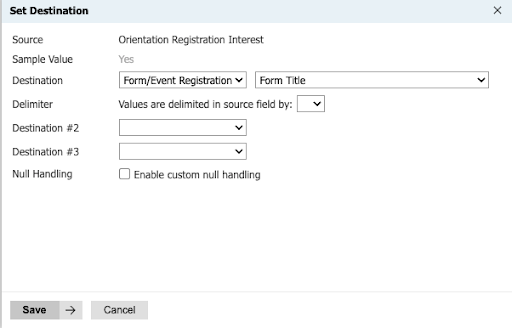
Map to “Form/Event Registration” - “Form Title”
-
-
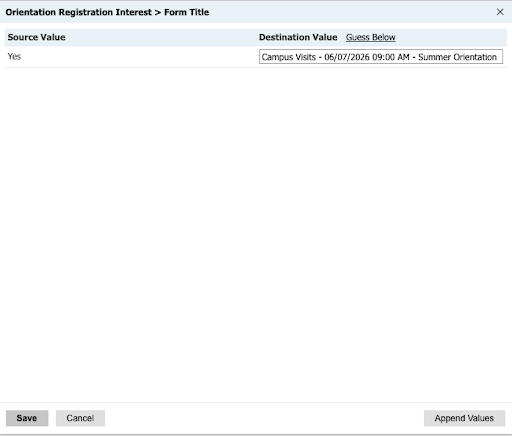
In your Prompt Value Mappings, map the question to the correct event in your Slate instance
-
The event must already exist in your Slate instance. If it does not, create the event in Slate before completing this step.
-
-
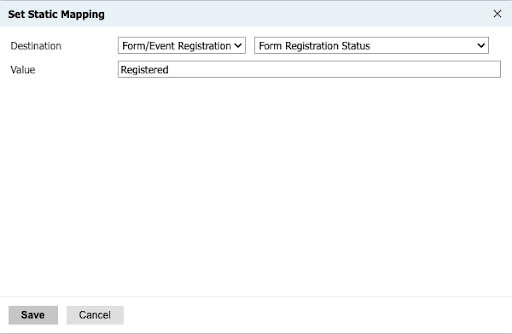
Add a Static Mapping for “Form/Event Registration” - “Form Registration Status” = “Registered”
This ensures that any student who answered "Yes" is automatically marked as Registered for the event in Slate.
Need help setting this up? Contact your Partner Success Consultant for assistance.