![Halda Logo Black Tight-2.svg]](https://info.halda.ai/hubfs/Halda%20Logo%20Black%20Tight-2.svg)
AI Campaign Emails
The biggest release for February and March is our AI Email Campaigns. There is a lot to cover with this new functionality, so check out these resources to learn more:
- Explore what campaigns are and how they work.
- Learn more about configuration.
- Book a demo to get started.
Non-Target Segment Controls
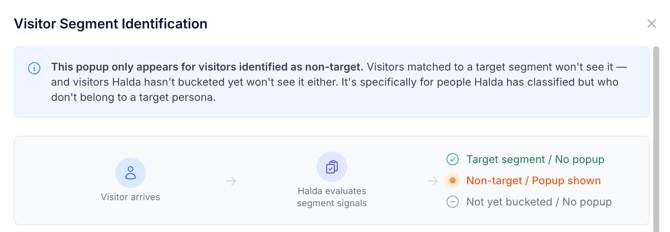
You've always been able to segment students. Now you can control what non-target segments see — and don't see.
When a visitor falls outside your target segments, Halda can show a custom identification pop-up, hide forms and the hub entirely, and exclude those visitors from your conversion metrics.
.png?width=670&height=292&name=Screenshot%202026-03-19%20at%205.40.55%20PM%20(1).png)
You configure it all from the segment settings. Target the students you want. Filter out the ones you don't. Your data stays clean and your engagement numbers reflect the audience that matters.
Salesforce Segment Routing
Segmented leads can now route directly to Salesforce by segment.
Set it up in the builder, map each segment to the right Salesforce destination, and let the leads flow where they belong. No manual sorting. No workarounds.
Lead Profile Archiving
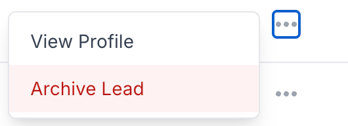
From the Student Records page, you can now archive lead profiles.
Archiving cascades to everything tied to that student — form submissions, AI Search conversations, texts, calls. The student drops out of your metrics entirely.
When a record shouldn't be there anymore, now it doesn't have to be.
Bulk Resegmentation
Segment rules change. Student data changes. Now your segments can keep up.
When you update segment criteria, you can resegment students in bulk — no manual cleanup, no stale lists sitting around misleading your team.
Topic Card Improvements
Topic cards got a handful of quality-of-life upgrades:
- Default expiration extended from 90 days to one year
- Color-coded expiration badges so you can spot what's aging at a glance
- Larger, reorganized instruction UI
- A new publish date field for better tracking
AI Search Ratings Updates
The AI Search ratings experience is cleaner now. Scores of 4 or below were incorrectly showing as "Not Rated" — that's fixed. You can also delete ratings, and we've rebranded "AI SEO Feedbacks" to just "Feedbacks." Simpler name, same function.
AI Training Dashboard — Audit Progress
The AI Training Dashboard now shows your progress reviewing audits — both the count of responses you've viewed and responses you've rated. You can see where you stand without digging through the data.
AI Training — External Feedback Links
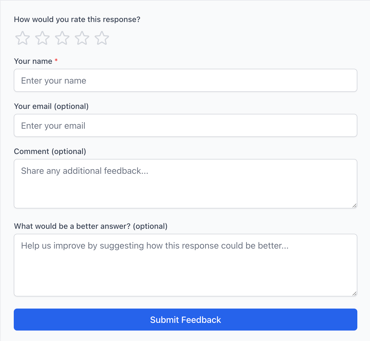
Non-Halda users can now submit feedback on audit questions through shareable links. Send a link to a member of your team, they review and rate, and the feedback flows right back into your training data.
If you have any questions or need help activating new features, reach out to your Account Manager.