![Halda Logo Black Tight-2.svg]](https://info.halda.ai/hubfs/Halda%20Logo%20Black%20Tight-2.svg)
What is AI Search?
AI Search is Halda's conversational search experience that lets website visitors ask questions in plain language and receive instant, AI-generated answers drawn from your website's content and knowledge you have added to your Halda account knowledge base.
How Does It Work for Visitors?
AI Search can be visible/used in the following places:
AI Form Response Pages: This is an optional configuration where visitors can use the AI Search tool after submitting an AI Form.

AI Hub: On the right hand side of the hub, AI Search is available for students to interact with. This section also hosts AI Calls and AI SMS if you are using Halda's Always-On Recruiter Agent.
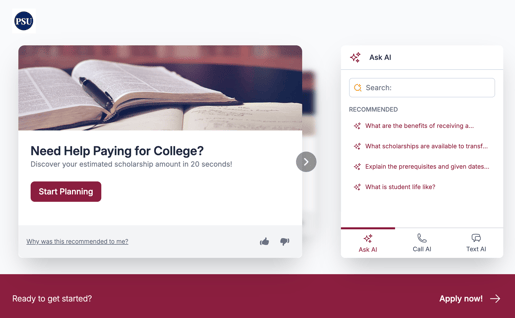
Search Button: Replace a search or other type of button on your website, so when it is clicked AI Search appears.
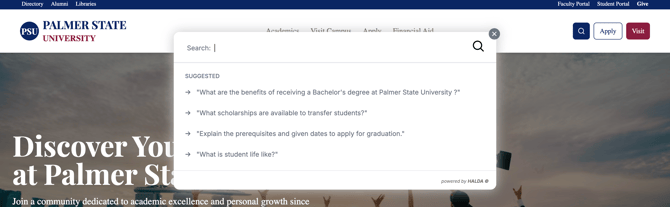
Once visible, the visitor simply types a question, like "What is the application deadline?" or "Do you offer financial aid?", and AI Search responds with a summarized answer along with links to the relevant pages on your site.
Key parts of the visitor experience include:
-
Recommended Searches: Before a visitor even types anything, AI Search shows a set of suggested questions to help them get started. These can be manually curated by your team or auto-generated based on your website's most popular content and FAQs.
-
Real-Time Answers: Answers stream in as they are generated, so visitors see the response appear word-by-word rather than waiting for a full page load.
-
Source Links: Every answer includes links back to the specific pages on your website where the information was found, so visitors can verify and explore further.
-
Follow-Up Questions: After receiving an answer, visitors are shown "Try asking:" suggestions — related follow-up questions they might want to explore next, keeping the conversation going naturally.
-
Conversation History: AI Search remembers the context of the current conversation, so visitors can ask follow-up questions without repeating themselves. Recent searches are also shown for easy reference.
-
Thumbs Up / Thumbs Down Feedback: Visitors can rate the quality of an answer, which helps your team identify areas for improvement.
Where Does AI Search Get Its Answers?
AI Search draws its knowledge from several sources, all tied to your website and content:
-
Your Website Content: AI Search reads and understands the pages on your website. It uses your site's URL as its primary source of truth, searching and summarizing information from your published web pages.
-
Topic Instructions (Topic Cards): These are curated pieces of knowledge that your team creates for specific topics. If a visitor asks about something covered by a Topic Card, AI Search uses those hand-crafted instructions to provide a precise, controlled answer. This is especially useful for frequently asked questions or topics where you want to ensure a specific response.
-
Uploaded Documents: If enabled, your team can upload PDFs and other documents that AI Search can reference when answering questions. This is useful for content that isn't published on your website.
How Do Admins Manage AI Search?
The Halda dashboard provides three main areas for managing AI Search:
1. AI Search Configuration (Main Dashboard)
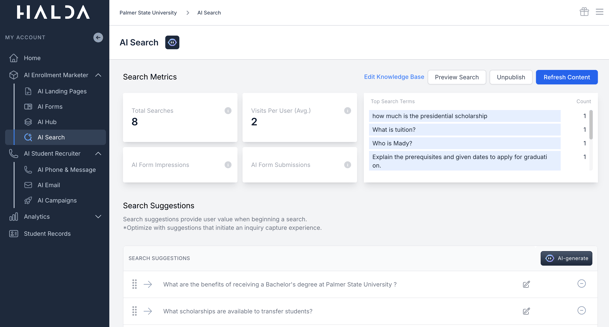
This is the home page for AI Search. From here, you can:
- Publish or unpublish AI Search on your website
- Preview how AI Search looks and behaves
- Manage search suggestions — the starter questions visitors see
- View search metrics — how many searches are happening and how well AI Search is performing
- Customize the call-to-action messaging
2. AI Knowledge Base
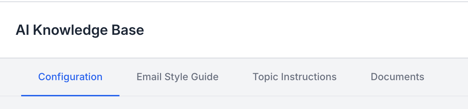
This is where you control what AI Search knows. It includes:
- Configuration: Set the website URL that AI Search should learn from, customize the brand tone, set a "can't find answer" fallback message, and add a disclaimer.
- Email Style Guide: Configure how AI-generated emails should look and sound.
- Topic Instructions: Create and manage Topic Cards for specific subjects
- Documents: Upload supplementary files for AI Search to reference.
3. AI Training
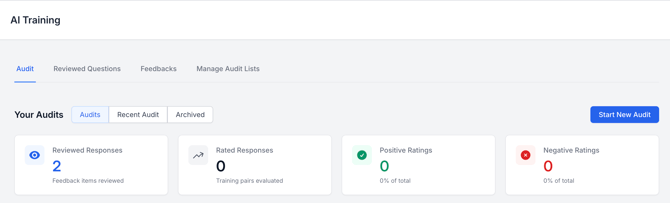
This is where you review and improve AI Search's performance over time. You can:
- Run audits — test AI Search against a list of questions to see how well it answers them.
- Review answers — look at real visitor questions and rate the quality of AI Search's responses.
- Create Topic Cards from training — when you find a question AI Search struggles with, you can create a new Topic Card right from the training interface to fix it.
If you have any questions, reach out to your Partner Success Manager.