![Halda Logo Black Tight-2.svg]](https://info.halda.ai/hubfs/Halda%20Logo%20Black%20Tight-2.svg)
As you configure campaigns, you may run into issues with metrics loading, adjusting email content, or not knowing if emails have been sent. This guide is designed to help you troubleshoot issues you are experiencing and identify if this is an issue that needs to be escalated with the Halda team.
Emails Not Sending
When a campaign is active but students aren't receiving emails, the issue usually lies in Slate.
- Check Integration Status: Confirm that your Slate integration is active and the “Export Email Content” has been configured in the integrations page. To find this page, navigate the the menu in the top right corner of the app and select "Integrations."
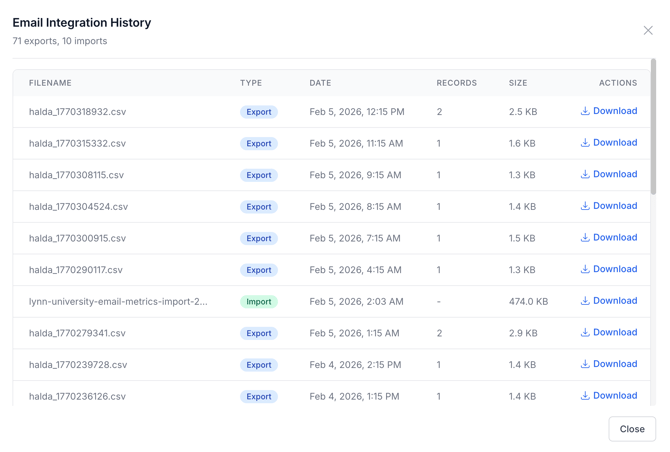
- View Email History: Click this button in the integration page to view the email files that Halda has sent to Slate. If this is empty, Halda has not sent files, but if you see files listed it means Halda has successfully passed email files to Slate’s system
- Confirm Source Formats and Mailings are Active: If Halda is sending email files to Slate, but the emails are not sending, it is likely that either the Source Format or the Mailing are not active.
- Suppressions and Opt-Outs: Students will not receive emails if they have opted-out of receiving email communications from the university.
Metrics Not Loading in the Halda App
If your dashboard looks like a "ghost town" or shows "No Data Available," it’s often a reporting delay or an integration issue.
- Verify Mapping for Email Import in Halda: In the “View Email History” log, you will be able to see files Halda has received with email reporting metrics. These files are listed as an “Import” in the “Type” column. If you are seeing the import, but data is not loading, please contact your PSM. If you are not seeing any import files, this means that Slate is not sending Halda the query.
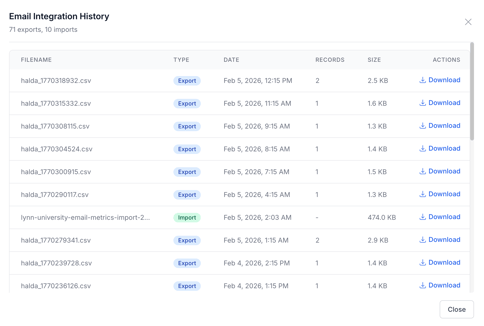
- Verify the Email Metric Query in Slate is Active: If no "Import" files are present in the email history log, connect with your Slate Captain to ensure the query is activated.
Email Content Not Accurate
Halda uses generative AI, and as a result inaccuracies may occur when the AI lacks specific context or "hallucinates" details based on outdated data.
- Update the AI Knowledge Base: Ensure that the AI Knowledge Base has been fully configured and topic instructions are in place. Check to see if any content in the brand tone or topic instructions could be impacting content generation negatively. Examples of this include: telling the AI to always use a url (leads to url hallucination),
- Review Campaign Setup: If the content of your campaign is not what you anticipated, review the instructions that you have provided for campaign setup. Use the “Manage Facts” and “Content Editor” to adjust information and prompts to ensure accuracy.
If you have gone through the troubleshooting steps listed above without resolution, or the issue you are experiencing is not mentioned, please reach out to your Partner Success Manager.